| Spec | Value | Source |
|---|---|---|
| Recommended resolution | 3840 × 2160 px | Add custom thumbnails on YouTubeverified |
| Minimum width | 640 px | Add custom thumbnails on YouTubeverified |
| Aspect ratio | 16:9 | Add custom thumbnails on YouTubeverified |
| File formats | JPG or PNG (named as examples) | Add custom thumbnails on YouTubeverified |
| Max file size, phone upload | 2 MB | Add custom thumbnails on YouTubeverified |
| Max file size, computer upload | 50 MB | Add custom thumbnails on YouTubeverified |
| Spec | Value | Source |
|---|---|---|
| Recommended resolution | 2160 × 3840 px | Add custom thumbnails on YouTubeverified |
| Minimum height | 640 px | Add custom thumbnails on YouTubeverified |
| Aspect ratio | 9:16 | Add custom thumbnails on YouTubeverified |
| Max file size, computer upload | 50 MB | Add custom thumbnails on YouTubeverified |
| Where to add a custom one | YouTube Studio on a computer, verified accounts | Add custom thumbnails on YouTubeverified |
| Spec | Value | Source |
|---|---|---|
| Recommended resolution | 1280 × 1280 px | Create a podcast in YouTube Studioverified |
| Aspect ratio | 1:1 | Add custom thumbnails on YouTubeverified |
| Max file size, phone upload | 10 MB | Add custom thumbnails on YouTubeverified |
| Max file size, computer upload | 50 MB | Add custom thumbnails on YouTubeverified |
| Spec | Value | Source |
|---|---|---|
| Recommended (especially for TV) | 2560 × 1440 px | Manage your channel brandingverified |
| Minimum upload size | 2048 × 1152 px | Manage your channel brandingverified |
| Aspect ratio | 16:9 | Manage your channel brandingverified |
| Safe area for text and logos (at the minimum size) | 1235 × 338 px | Manage your channel brandingverified |
| Max file size | 6 MB | Manage your channel brandingverified |
| Spec | Value | Source |
|---|---|---|
| Shown at | 98 × 98 px | Manage your channel brandingverified |
| File formats | JPG, GIF, BMP or PNG (no animated GIF) | Manage your channel brandingverified |
| Max file size | 15 MB | Manage your channel brandingverified |
| Spec | Value | Source |
|---|---|---|
| Minimum size | 150 × 150 px | Manage your channel brandingverified |
| Shape (square) | 1:1 | Manage your channel brandingverified |
| Max file size | Under 1 MB | Manage your channel brandingverified |
| Spec | Value | Source |
|---|---|---|
| Custom image, at least | 300 × 300 px | Add end screens to videosverified |
| Spec | Value | Source |
|---|---|---|
| Max file size per image | 16 MB | Create a postverified |
| File formats | JPG, PNG, GIF, WEBP | Create a postverified |
| Suggested aspect ratio | 1:1 | Create a postverified |
| Images per post | Up to 10 | Create a postverified |
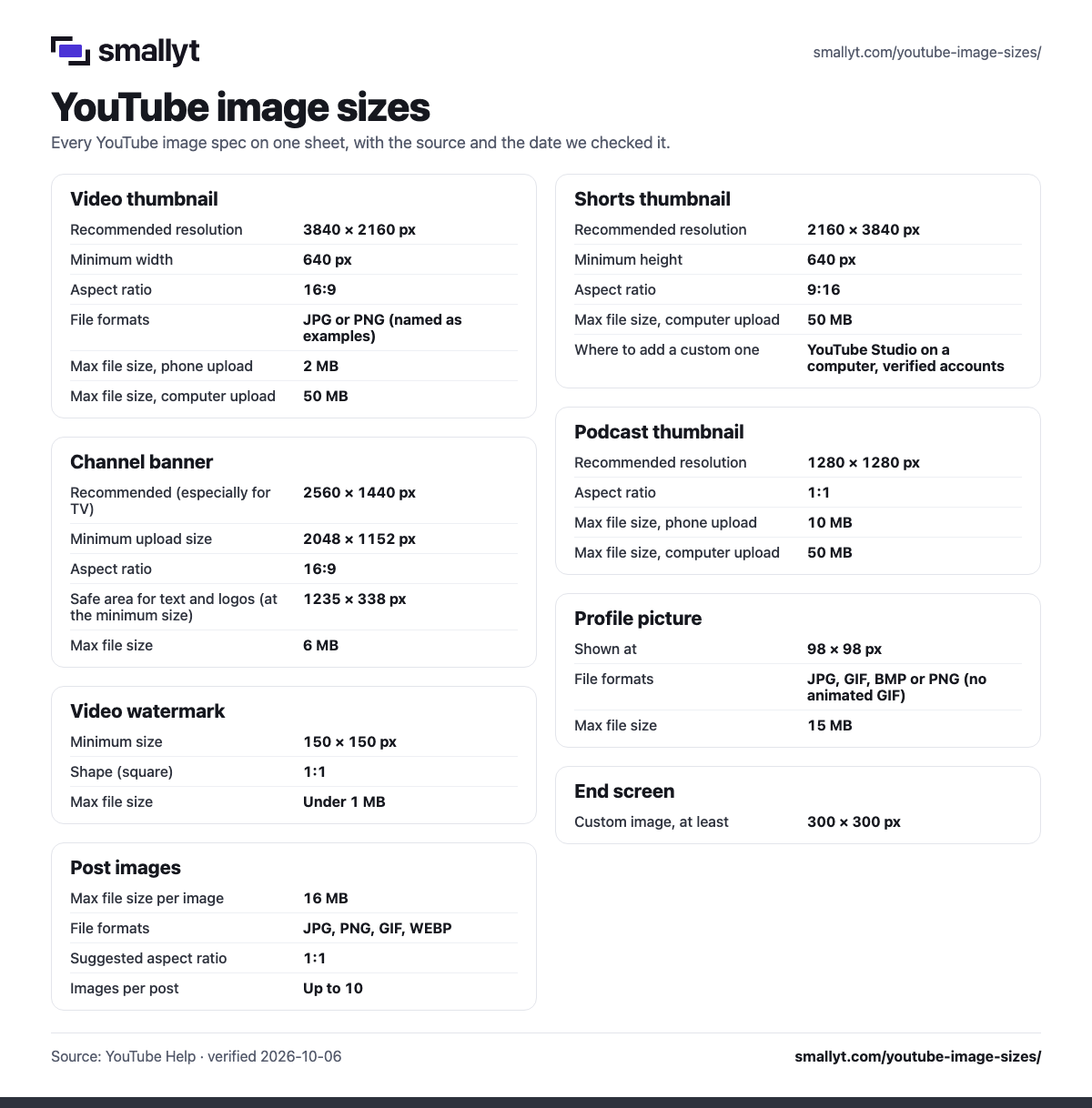
YouTube image dimensions: recommended, minimum and shown
The sheet uses three kinds of numbers, and they mean different things. A recommended size (3840 × 2160 for a video thumbnail, 2560 × 1440 for a banner) is what YouTube Help asks for. A minimum (640 px wide for a thumbnail, 2048 × 1152 for a banner) is the floor for an upload. A shown size, like the profile picture that renders at 98 × 98 px, is what viewers see.
YouTube Help also says a custom thumbnail "should be as large as possible" because it doubles as the preview image of the embedded player. For how large thumbnails are actually drawn on youtube.com, see our measured display sizes.
YouTube banner, profile picture and watermark sizes
One banner image is used on computers, phones and TVs, and YouTube Help notes it will get cropped on certain views and devices, so keep text and logos inside the 1235 × 338 px safe area of a 2048 × 1152 upload. The profile picture accepts JPG, GIF, BMP or PNG up to 15 MB, but no animated GIF.
The video watermark is a square image of at least 150 × 150 px and under 1 MB. You choose when it appears: the last 15 seconds, from a start time you pick, or the entire video.
Download or embed the YouTube image size chart
The PNG above is the same sheet as an image, in English, Korean and Japanese. Use it in a course, a team wiki or a newsletter; the embed code links back to this page so readers can check the sources. We re-read the YouTube Help articles and update the date when a number changes.
Source: Add custom thumbnails on YouTube, Create a podcast in YouTube Studio, Manage your channel branding, Add end screens to videos, Create a post · 2026-10-06
Frequently asked questions
What are all the YouTube image sizes in 2026?
As of 2026-10-06: video thumbnail 3840 × 2160 px, Shorts thumbnail 2160 × 3840 px, podcast thumbnail 1280 × 1280 px, banner 2560 × 1440 px (minimum 2048 × 1152), profile picture shown at 98 × 98 px, watermark at least 150 × 150 px, end screen custom image at least 300 × 300 px. Post images have no pixel size, only a 1:1 suggestion and a 16 MB limit.
Is there one YouTube image size for all devices?
Each image is uploaded once and YouTube scales it per device. The banner is the one to watch: the same file is shown on computers, phones and TVs and is cropped differently on each, which is why only the safe area is shown everywhere.
How big should a YouTube watermark be?
At least 150 × 150 px, square, and smaller than 1 MB. Watermarks are not shown on videos set as made for kids.
What size is a YouTube podcast or playlist cover?
For a podcast, YouTube Help recommends a square 1280 × 1280 px thumbnail (1:1), up to 10 MB from a phone or 50 MB from a computer. The playlist thumbnail article explains how to add an image but gives no pixel size, so we do not list one.
What image size works for YouTube posts?
Use square images: YouTube suggests 1:1 because that is how images appear in the feed, and viewers can tap to see the full image. Each file can be up to 16 MB as JPG, PNG, GIF or WEBP, and one post can hold up to 10 images.
Why did my thumbnail look different on the home page?
If a vertical video has a 16:9 custom thumbnail, YouTube replaces it with an auto-generated 4:5 thumbnail on the home, explore and subscription pages. Your own thumbnail still appears on the watch feed, in watch history and on non-mobile platforms.